
Robot Coloring Pages for Kids: Printable STEM Sets
Robot coloring pages work well for STEM units, makerspace tables and any child who would rather draw a machine than a flower. A good set has bold outlines, friendly designs and enough mechanical parts, such as gears and antennas, to keep older children interested. The packs below run from preschool to fourth grade, so one folder can serve a mixed group.
Here are the kinds of robot pages you can find:
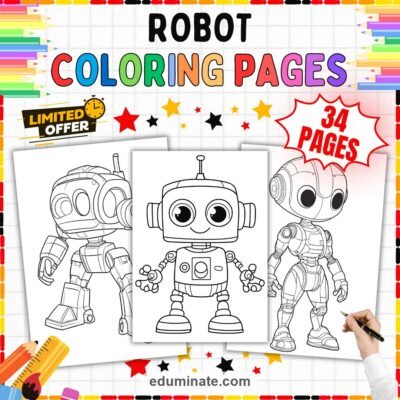
- Friendly robots with round antennae, claw hands and chest meters.
- Retro bots with box bodies and simple buttons.
- Chibi androids with big heads and round buttons.
- Gears, circuit boards and flashing antennas to shade in detail.
- Vintage desktop computers, monitors and keyboards for a technology theme.
In this article (10 sections)
- Free robot coloring pages
- Robot coloring packs compared
- All four packs in one download
- Classroom uses for robot coloring pages
- Why robots draw in reluctant colorers
- Using robot pages in a STEM unit
- Fine motor skills and focus tips
- A simple 20 minute robot lesson
- Which page for which age
- Frequently asked questions
Free robot coloring pages
Many people look for a free robot download first. At the time of writing, we do not have a free robot pack. A quick option with no printing: ask children to draw a robot from simple shapes, such as a square body, a rectangle head and circle joints, then color it and write what the robot does. Free packs in our shop on other themes take an email address, which opens a free account and keeps the file in My Library.
The paid packs below give you finished line art in a consistent style, with 26 to 70 pages in each file. That saves prep time when a whole class needs a page each.
Robot coloring packs compared
Each pack is a single PDF. All four product pages state that their A4 files print on US Letter with Fit to page.
- The Robot Coloring Pages 70 Cute Futuristic Android pack has 70 pages, with 66 coloring drawings, for $8.99. It shows cheerful retro robots, chibi androids with round buttons, futuristic cyborgs with power boots and multi-jointed machines. It is listed for Pre-K to 4th grade.
- The Robot Coloring Pages Technology and STEM pack also has 70 pages for $8.99. Its description lists friendly metal androids, rotating gears, circuit boards, antennas, robotic arms and battery gauges. It is listed for Pre-K to 4th grade.
- The Robot Coloring Sheets 34 Cute Mech Armor Android pack has 34 pages, with 30 drawings, for $4.99. It includes chibi androids, armored mech suits with visor helmets and humanoid robot explorers. It is listed for Pre-K to 4th grade.
- The Robot and Technology Coloring Pages pack has 26 pages, with 22 drawings, for $3.99. It combines smiling robots with vintage desktop computers, monitors, keyboards and dials. It is listed for Pre-K to 3rd grade.
The two 70-page packs are the best fit for a class set. Choose the Technology and STEM pack if you want circuits and gears to lead a lesson, and the Futuristic Android pack if your group likes character designs.
All four packs in one download
The Robot Coloring Pages Printable Bundle holds all four packs. That is 200 pages for Pre-K to 4th grade at $20.22. The separate prices add up to $26.96, so the bundle saves $6.74, which is 25 percent. It suits a school-wide STEM week or a makerspace that needs a large, varied folder.
Classroom uses for robot coloring pages
Design a helper robot
Give each child a robot page and ask: what job would your robot do? Children color the robot, add tools or buttons that fit the job and write a short caption. Answers might include watering plants, carrying books or sorting crayons. The task asks for planning and cause-and-effect thinking without any tech on the desk.
Shapes and parts
Robot bodies are built from rectangles, circles and squares. Ask young children to find and color all the circles in one color, all the rectangles in another. Then count each kind. Older children can write a number sentence from the counts.
Gears and machines talk
On a page with gears, ask what happens when one gear turns. Children can trace the turning direction with an arrow. This pairs well with a simple machines lesson and needs no equipment.
Makerspace arrival station
Set a basket of robot pages at the makerspace door. Children color while they wait for a turn at a build station. The page becomes a plan: they color the robot they intend to build from blocks or recycled boxes.
Writing prompts for robot fans
- Write three sentences about what your robot can do.
- Describe how your robot helps at home.
- Explain what your robot needs to keep working, such as a battery.
- Tell a partner one problem your robot could solve at school.
Keep the focus on machines that help people, which suits a unit on how tools make work easier.
Why robots draw in reluctant colorers
Some children say they do not like coloring because they find flowers and animals fussy. Robots can change that. The shapes are boxes, circles and straight lines, the outlines are bold and there is room for invention. A child can give a robot any colors, because there is no right answer for what color a machine should be. That freedom lowers the pressure to get it correct.
Using robot pages in a STEM unit
Robot coloring pages sit comfortably beside a robotics or simple machines unit. Introduce the vocabulary first: sensor, motor, battery, gear, program. Then give children a page and ask them to point to one part and say what they think it does. After coloring, they can write a short label for each part.
- Ask: which part helps the robot see, and which part helps it move?
- Let children color wires and cables in two colors, then trace a path from battery to motor.
- Have a pair of children give instructions step by step, such as “color the head blue,” and check whether the partner followed them exactly. This is a gentle first lesson in how a program works.
The last activity needs only a page and a pencil, and it shows children why a robot needs clear, ordered directions. It also gets them talking in full sentences.
Fine motor skills and focus tips
- Ask younger children to color the large body panels first and the small buttons last.
- Show how to use straight strokes for metal panels and small circles for dials.
- Offer gray, silver and blue pencils for older children who want to shade metal.
- Print on thicker paper if you hand out markers.
- For restless colorers, set a timer and ask them to finish one body part before the next.
Robot pages mix big flat areas with small details, which gives practice in both grip strength and careful control. Children who find flowers or animals too fussy often settle faster with straight-edged shapes.
A simple 20 minute robot lesson
- Spend three minutes asking what a robot is and where children have seen one. Write two words on the board, such as machine and battery.
- Give out the pages. Children color for ten minutes.
- Each child names the robot and writes or says its one job.
- End with a gallery walk, where children visit three robots and say what job each one does.
If your class is also studying planets and rockets, our guide to space coloring pages pairs well with a robot week, since explorers and machines often share the same unit.
Which page for which age
Preschool and kindergarten
Choose pages with one large robot and few parts. Offer thick crayons and accept any colors. A pink robot is welcome.
First and second grade
Children can color full-body robots and add a background, such as a workshop table. Ask them to give the robot a name and a job.
Third and fourth grade
Older children can shade metal parts, label gears and write a paragraph about how their robot works. The two 70-page packs are listed up to 4th grade and have the most detailed pages.
Frequently asked questions
Are there free robot coloring pages in your shop?
Not at the time of writing. Free packs on other themes take an email address, which opens a free account and keeps the file in My Library.
What grades do the robot packs suit?
Three packs and the bundle are listed for Pre-K to 4th grade. The 26-page Robot and Technology pack is listed for Pre-K to 3rd grade.
Can I print them on US Letter paper?
Yes. Each of the four product pages says its A4 files print on US Letter with Fit to page.
Do the robots have faces?
Some do. The 26-page pack describes smiling robots, and the Futuristic Android pack includes cute chibi designs. Check the preview images on each product page if you prefer a particular style.